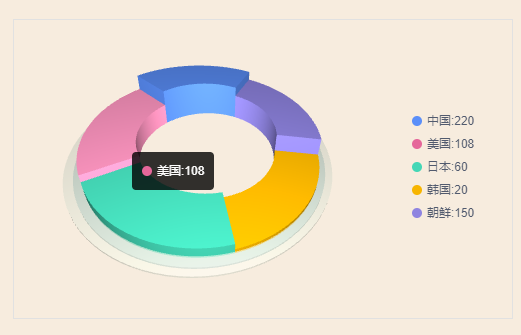
基于three.js的3d环形图 发表于 2021-04-08 业务需求需要一个3d环形图,现成的轮子只有收费的highcharts,没办法手撸一个 代码如下 123456789101112131415161718192021222324252627282930313233343536373839404142434445464748495051525354555657585960616263646566676869707172737475767778798081828384858687888990919293949596979899100101102103104105106107108109110111112113114115116117118119120121122123124125126127128129130131132133134135136137138139140141142143144145146147148149150151152153154155156157158159160161162163164165166167168169170171172173174175176177178179180181182183184185186187188189190191192193194195196197198199200201202203204205206207208209210211212213214215216217218219220221222223224225226227228229230231232233234235236237238239240241242243244245246247248249250251252253254255256257258259260261262263264265266267268269270271272273274275276277278279280281282283284285286287288289290291292293294295296297298299300301302303304305306307308309310311312313314 <template> <div class="Pie-chart"> <div class="chart-container"> <div class="chart-legend"> <div v-for="(item,i) in data" class="legend-item" ><span :style="`background:${colors[i]}`"></span>{{item.text}}:{{item.value}}</div> </div> <div class="tooltip" :style="`left:${tooltipX+10}px;top:${tooltipY+10}px`" v-show="showTooltip"> <div><span :style="`background:${colors[toolTipCurrentIndex]}`"></span>{{data[toolTipCurrentIndex].text}}:{{data[toolTipCurrentIndex].value}}</div> </div> </div> </div></template><script>import * as THREE from 'three'import TWEEN from '@tweenjs/tween.js'export default { name: '3dPieChart', data(){ return{ toolTipCurrentIndex:0, showTooltip:false, tooltipX:0, tooltipY:0, colors:['#5B8FF9','#E5679A','#44D7B6','#F7B500','#8F84E0','#FF8362','#6FD8D6','#E55050'], highLightcolors:['#7EA8FF','#FF96C1','#80E5CE','#FFD338','#B1A7FD','#FFAB94','#99F7F5','#FF6E6E'], maxDepth:100,//最大高度 maxVal:0, data:[ {value:220,text:"中国"}, {value:108,text:"美国"}, {value:60,text:"日本"}, {value:20,text:"韩国"}, {value:150,text:"朝鲜"}, ] } }, mounted(){ this.init() }, methods:{ init(){ var that = this; var container; var camera, scene, renderer; var group; var targetRotation = 0; var targetRotationY = -1; var targetRotationOnMouseDown = 0; var targetRotationOnMouseDownY = 0; var mouseX = 0; var mouseXOnMouseDown = 0; var mouseY = 0; var mouseYOnMouseDown = 0; var windowHalfY= window.innerHeight / 2; var windowHalfX = window.innerWidth / 2; var innerRadius = 250;//内环半径 var outRadius = 420; //计算最大值 var arr = [] that.data.forEach(item=>{ arr.push(item.value) }) that.maxVal = Math.max(...arr) console.log(that.maxVal) init(); animate(); function init() { container = document.querySelector('.chart-container') scene = new THREE.Scene(); camera = new THREE.PerspectiveCamera( 50, 2, 1, 5000 ); camera.position.set( 0,0, 1000 ); scene.add( camera ); var light = new THREE.PointLight( 0xffffff, 0.8 ); var ambientLight = new THREE.AmbientLight(0xffffff,0.5) scene.add(ambientLight) camera.add( light ); group = new THREE.Group(); scene.add( group ); //最佳视角自己调 group.position.y = 100; group.rotation.x = -0.9 group.rotation.y = 0.1 group.translateX(-200) function addShapeDRN( depth=20, rotation=0,color,index) { var arcShape = new THREE.Shape(); arcShape.moveTo( outRadius, 0 ); arcShape.lineTo( innerRadius, 0 ); arcShape.absarc( 0, 0, innerRadius, 0, Math.PI * 2/that.data.length, false ); arcShape.absarc( 0, 0, outRadius,Math.PI * 2/that.data.length,0, true ); /** *curveSegments — int,曲线上点的数量,默认值是12。 steps — int,用于沿着挤出样条的深度细分的点的数量,默认值为1。 depth — float,挤出的形状的深度,默认值为100。 bevelEnabled — bool,对挤出的形状应用是否斜角,默认值为true。 bevelThickness — float,设置原始形状上斜角的厚度。默认值为6。 bevelSize — float。斜角与原始形状轮廓之间的延伸距离,默认值为bevelThickness-2。 bevelSegments — int。斜角的分段层数,默认值为3。 extrudePath — THREE.CurvePath对象。一条沿着被挤出形状的三维样条线。 UVGenerator — Object。提供了UV生成器函数的对象。 */ var extrudeSettings = {curveSegments:48, depth: depth, bevelEnabled: false, bevelSegments: 9, steps: 2, bevelSize: 0, bevelThickness: 0 }; var geometry = new THREE.ExtrudeBufferGeometry( arcShape, extrudeSettings ); var material =new THREE.MeshPhongMaterial( { color: color ,opacity:1,transparent:true } ) var mesh = new THREE.Mesh( geometry,material ); mesh.position.set( 0, 0, 0 - 75 ); //存数据 mesh.myid = 'pie'+index; mesh.data = that.data[index] mesh.data.index =index; group.add( mesh ); mesh.rotateZ(rotation) } function addGround(depth,color,opacity,outDepth,y){//添加底座 var arcShape = new THREE.Shape(); arcShape.moveTo( outRadius, 0 ); arcShape.lineTo( innerRadius, 0 ); arcShape.absarc( 0, 0, innerRadius+2, 0, Math.PI * 2/1, false ); arcShape.absarc( 0, 0, outRadius+outDepth,0, Math.PI * 2/1, true ); var extrudeSettings = {curveSegments:48, depth: depth, bevelEnabled: false, bevelSegments: 9, steps: 2, bevelSize: 0, bevelThickness: 0 }; var geometry = new THREE.ExtrudeBufferGeometry( arcShape, extrudeSettings ); var material =new THREE.MeshPhongMaterial( { color: color ,opacity:opacity,transparent:true } ) var mesh = new THREE.Mesh( geometry,material ); mesh.position.set( 0, 0, 0 - y ); group.add( mesh ); } that.data.forEach((item,i)=>{ var myid = 'pie'+i; let tween = new TWEEN.Tween({ val: 0 }) .to( { val: 1 }, 500 ) .easing(TWEEN.Easing.Quadratic.InOut) .onUpdate(function(data) {//高度增加动画 group.children.forEach(children=>{ if(children.myid == myid){ group.remove(children) } }) var depth = 20+that.maxDepth*(item.value/that.maxVal)*data.val addShapeDRN( depth, Math.PI * 2/that.data.length*(i+1),that.colors[i],i); }) tween.start() }) addGround(5,'#AEC3BF',1,25,65) addGround(5,'#DDE1D2',0.6,50,60) console.log(group) renderer = new THREE.WebGLRenderer( { antialias: true,alpha: true} ); renderer.setPixelRatio( window.devicePixelRatio ); renderer.setClearColor(0xEEEEEE, 0.0); console.log(window.devicePixelRatio) renderer.setSize( container.clientWidth, container.clientHeight ); container.appendChild( renderer.domElement ); container.addEventListener( 'mousedown', onDocumentMouseDown, false ); container.addEventListener("mousemove", mouseEvent, false);//鼠标hover事件 // window.addEventListener( 'resize', onWindowResize, false ); } function mouseEvent(event){//用于hover事件 const raycaster = new THREE.Raycaster(); const mouse = new THREE.Vector2(); let px = renderer.domElement.getBoundingClientRect().left; let py = renderer.domElement.getBoundingClientRect().top; mouse.x = ( (event.clientX - px) / (renderer.domElement.offsetWidth) ) * 2 - 1; mouse.y = - ( (event.clientY - py) / (renderer.domElement.offsetHeight) ) * 2 + 1; raycaster.setFromCamera(mouse, camera); // 计算物体和射线的焦点 const intersects = raycaster.intersectObjects(scene.children, true); if(intersects.length!=0&&intersects[0].object&&intersects[0].object.myid){ that.showTooltip = true; that.toolTipCurrentIndex = intersects[0].object.data.index; that.tooltipX = event.clientX - px; that.tooltipY = event.clientY - py; highLightMesh(intersects[0].object.data.index) }else{ that.showTooltip = false; highLightMesh('') } } function highLightMesh(index){//高亮mesh group.children.forEach((item,i)=>{ if(item.myid&&item.myid == 'pie'+index){ var material =new THREE.MeshPhongMaterial( { color: that.highLightcolors[index] ,opacity:1,transparent:true } ) item.material = material; }else{ if(item.myid){ var material =new THREE.MeshPhongMaterial( { color: that.colors[item.data.index] ,opacity:1,transparent:true } ) item.material = material; } } }) } function onWindowResize() { camera.aspect = window.innerWidth / window.innerHeight; camera.updateProjectionMatrix(); renderer.setSize( window.innerWidth, window.innerHeight ); } function onDocumentMouseDown( event ) { event.preventDefault(); document.addEventListener( 'mousemove', onDocumentMouseMove, false ); document.addEventListener( 'mouseup', onDocumentMouseUp, false ); document.addEventListener( 'mouseout', onDocumentMouseOut, false ); mouseXOnMouseDown = event.clientX - windowHalfX; mouseYOnMouseDown = event.clientY - windowHalfY; targetRotationOnMouseDown = targetRotation; targetRotationOnMouseDownY = targetRotationY; } function onDocumentMouseMove( event ) { mouseX = event.clientX - windowHalfX; mouseY = event.clientY - windowHalfY; targetRotation = targetRotationOnMouseDown + ( mouseX - mouseXOnMouseDown ) * 0.02; targetRotationY = targetRotationOnMouseDownY + ( mouseY - mouseYOnMouseDown ) * 0.02; } function onDocumentMouseUp() { document.removeEventListener( 'mousemove', onDocumentMouseMove, false ); document.removeEventListener( 'mouseup', onDocumentMouseUp, false ); document.removeEventListener( 'mouseout', onDocumentMouseOut, false ); } function onDocumentMouseOut() { document.removeEventListener( 'mousemove', onDocumentMouseMove, false ); document.removeEventListener( 'mouseup', onDocumentMouseUp, false ); document.removeEventListener( 'mouseout', onDocumentMouseOut, false ); } function animate() { requestAnimationFrame( animate ); render(); TWEEN.update() } function render() { group.rotation.z += ( targetRotation - group.rotation.z ) * 0.05; renderer.render( scene, camera ); } } }}</script><style lang="scss"> .Pie-chart{ width: 100%; height: 100%; text-align:center; padding-top:200px; background: #f7ecde; } .chart-container{ display: inline-block; border: 1px solid #e1e1e1; width: 500px; height: 300px; position: relative; .chart-legend{ position: absolute; right: 0; top:0; display: flex; flex-direction: column; // align-items: center; justify-content: center; height: 100%; width: 20%; .legend-item{ display: flex; user-select: none; align-items: center; margin-bottom: 5px; cursor: pointer; span{ border-radius: 50%; margin-right: 5px; width: 10px; height: 10px; } } } .tooltip{ position: absolute; padding: 10px; background: rgba(0,0,0,0.8); border-radius: 4px; transition: all 0.3s; div{ display: flex; align-items: center; color: #fff; span{ border-radius: 50%; margin-right: 5px; width: 10px; height: 10px; } } } }</style>